
Loads on scroll
Industry
Maritime
Keep vessel, fleet, compliance and operational documentation organized and accessible.
(Combine OpenAI and Hermes with your monthly subscription to keep costs low.)



QDocs helps your team securely store, organize, search, and manage documents, emails, and files from one central workspace, with version tracking and controlled access built in.
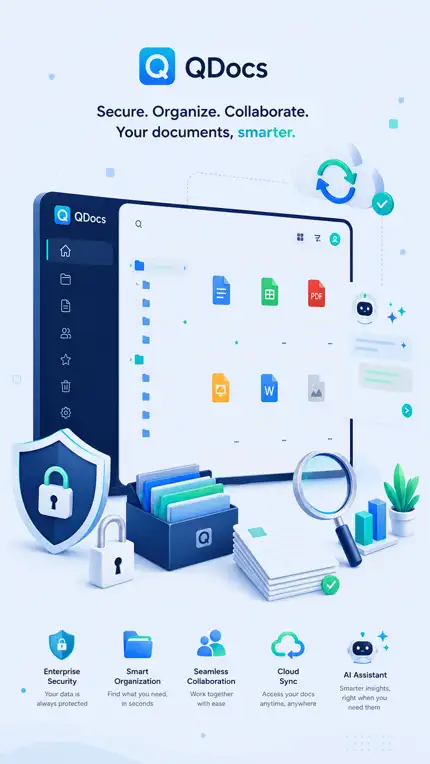
From operational records and technical files to client matters and business knowledge, QDocs gives teams one secure place to organize, find, version and control important documents and emails.
Keep vessel, fleet, compliance and operational documentation organized and accessible.
Organize matters, emails, evidence and client documents with permissions and version history.
Bring site, safety, equipment and project records into a structured document environment.
Keep client engagements, deliverables and institutional knowledge easy to find and reuse.
Manage policies, operational files and business documents with controlled access and traceability.
Control fast-moving technical, engineering and race-team documentation from one workspace.
QDocs brings storage, permissions, search, and version control into one clean document management experience.
Centralize business documents with controlled access, audit visibility, and enforced filing rules that ensure every document is saved consistently across your organization.
Search by client, matter, project, department, document type, author, dates, tags, and more — and find text inside documents, PDFs, and emails.
Run OCR on single or multiple PDF files inside QDocs, schedule overnight OCR batches, and make scanned documents searchable in multiple languages. The OCR tool can also run as a standalone application.
Use AI to ask questions about your documents, generate summaries, identify important dates, create tags automatically, and run advanced searches across your entire workspace.
Manage every version of a document in one place, easily compare changes, and restore previous versions with confidence.
Every document action is recorded, making activity easy to review, retrieve, and include in daily email reports.
Keep emails organized by automatically archiving them to the relevant client and matter.
Every document in QDocs is protected by multiple independent backups, helping ensure your files are never lost and can be recovered when needed.
Have your existing documents, files, and emails into QDocs using our dedicated import application.
We take business continuity seriously. QDocs can keep copies of your documents and related data in multiple physical locations to help protect against loss and support recovery when needed.
Choose the AI approach that best fits your organization: run local models such as Qwen or Gemma inside your office or private infrastructure so sensitive documents do not leave your environment, or connect to foundation models such as OpenAI or Anthropic Claude. We can also help you design and build the hardware needed to run local AI models.
Retrieve archived emails from years or even decades past, helping your organization preserve business history and recover important information when it is needed.
Use OpenAI or Anthropic Claude from within QDocs to understand existing information, create new documents, compare versions, and transform stored content into useful new knowledge. For data sovereignty, QDocs can also work with local models such as Qwen running inside your office or private infrastructure, so sensitive content stays under your control. Add Hermes Agents to automate repetitive work across documents, email, websites, calendars, and other information sources.
Work with the information already stored in QDocs without constantly moving documents between applications.
Load a QDocs document and use AI to draft a new report, letter, summary, briefing, or other business document.
Bring information from several QDocs documents together into a new consolidated document.
Load the two latest versions and ask AI to identify, summarize, and comment on what changed.
Connect QDocs with leading AI services or supported local models while keeping the document workflow inside QDocs.
Run models such as Qwen on your own hardware or private infrastructure so selected documents can be processed without leaving the office environment.
Hermes Agents can automatically find, read, extract, classify, and process information. Instead of only preserving organizational knowledge, QDocs can help create and act on it.
APIs connect your business systems. AI understands and creates content. Agents automate the work around that information.
Automatically download selected web information, process it, organize it, and create new knowledge in QDocs.
Identify deadlines, names, organizations, amounts, reference numbers, and other business-specific data from newly saved documents.
Detect non-searchable PDFs and automatically run OCR so their contents become searchable and available for AI processing.
Let users build agents that process incoming emails, identify the relevant client or matter, extract information, and archive messages and attachments.
Recognize meetings, deadlines, reminders, and time-sensitive information in emails and create the appropriate calendar events.
Create a voice summary of the previous day's work, important activity, documents, emails, and deadlines, then deliver it through your preferred messaging app.
QDocs provides API endpoints and MCP (Model Context Protocol) connectivity that let your CRM, ERP, accounting platform, line-of-business applications, custom software, and AI-enabled tools communicate with your document management environment.
External applications can create and import documents, files, calendar events, contacts, metadata, and other business information into QDocs. Automate archiving instead of asking users to manually upload and organize every item.
When a transaction, project, customer record, case, or business process is completed elsewhere, its associated information can be transferred to QDocs for controlled storage, search, versioning, auditing, and long-term retrieval.
Send files and business documents directly into the correct QDocs location.
Preserve the documents generated by the systems your teams already use.
Create and synchronize useful business information alongside your documents.
Build anything from simple automated archiving to integrated end-to-end processes.
Connect AI assistants and agent-based applications to QDocs through MCP, giving authorized AI tools a standardized way to discover and work with QDocs capabilities and business content. Use MCP-enabled workflows to find documents, retrieve relevant context, and connect document operations with AI-driven processes while keeping QDocs at the center of your information environment.
Give each department the right level of access while keeping a clear record of document activity.
Role-based permissions and clear accountability help the right people access the right information.
QDocs integrates with Microsoft Office, supports browser-based access, and can be deployed in the environment that best suits your organization.
Choose the infrastructure model that fits your organization while keeping QDocs available wherever your team works.
Work with QDocs directly from familiar Microsoft Office applications (Word, Excel, Outlook, Powerpoint, PDF) for a smoother day-to-day experience.
Use QDocs from any web browser for convenient access beyond the desktop application, whether you are working on Windows, macOS, Linux, iPhone, or Android.
Deploy QDocs on your own on-premises infrastructure, in public cloud platforms such as Amazon Web Services or Microsoft Azure, or with a private hosting provider. Available on Windows and Linux Servers.
QDocs helps your team handle documents more efficiently, with fewer manual steps and less confusion.
Bring documents and business knowledge into one organized system instead of leaving them across folders, inboxes, and devices.
Without a centralized system, documents can become scattered across devices, formats, systems, and physical locations, making information harder to organize, manage, and retrieve when needed.
Managing document versions manually can create confusion, inconsistencies, and errors, making it difficult to identify the latest version and increasing the risk of teams working from outdated information.
Without a proper system, collaborating on documents can lead to confusion, duplicated work, and missed updates, making it harder for teams to coordinate and work efficiently.
When a person leaves the organization, important documents, emails, and project information may remain stored in personal folders, mailboxes, or individual devices, making it difficult for the business to access, continue, and recover critical work.
Short visual stories help visitors understand the value of QDocs before they ever book a demo.
Use a clean office, document, filing, or teamwork clip here.
Ideal for a search, laptop, productivity, or knowledge-work clip.
Ideal for a mobile, remote-work, cloud, or team collaboration clip.
Use QDocs to bring structure, security, consistency, and speed to the way your organization manages documents and information.
Use the form to request a demo or discuss your document management needs.
Request a demo and discuss your document, email, security, deployment, and workflow requirements with us.